
The useful question is not which label maker has the most buttons, but whether your labels need to leave a keyboard, carry more information, or stay within a narrow folder spine. For a Malaysian small office, Brother PT-D460BT is our overall pick at RM499: 18mm tape support and USB/Bluetooth connectivity make it a meaningful step beyond occasional cupboard labelling. The budget choice is the RM259 PT-D210; the RM629 PT-D610BT is the specialist upgrade for wider asset labels and more stored designs.
All three exact models were in stock at Brother Malaysia’s official e-store when checked on 21 October 2026. These are researched buying recommendations, not claims of hands-on testing. They use narrow TZe laminated tape; this comparison is not a shopping guide for courier waybill printers or full-page shipping labels.
Match the printer to the label
| Model | Checked price | Tape ceiling | Max speed | Workflow | Main reason |
|---|---|---|---|---|---|
| Brother PT-D210 | RM259 | 12mm | 20mm/s | Standalone keyboard | Short names;30 memory locations |
| Brother PT-D460BT | RM499 | 18mm | 30mm/s | USB / Bluetooth | Connected office tasks |
| Brother PT-D610BT | RM629 | 24mm | 30mm/s | Standalone; USB / Bluetooth | 24mm layouts;99 memories |
Maximum tape width is not the same as usable printed height. Margins and layout settings still take space. Before spending more, sketch the actual wording, identifier or code you want to attach, then decide whether 12mm, 18mm or 24mm tape gives the layout enough room. A bigger machine cannot fix a poorly chosen label size for a small cable or curved container.
Brother PT-D210: the low-cost standalone organiser
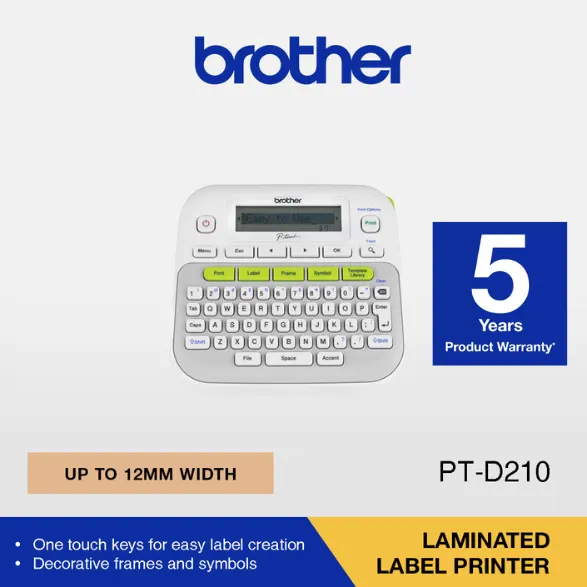
At RM259, the PT-D210 suits a home filing corner or an office that prints short names beside the item being organised. Brother specifies TZe tapes up to 12mm, a graphical LCD preview, print speed up to 20mm per second and 30 memory locations. Saving a repeated folder heading is more useful here than paying for connectivity that nobody will use. Its compact white keyboard body also makes its local, standalone purpose clear.
Pros
- Lowest verified purchase price, with preview before printing.
- Thirty saved labels cover a modest set of repeated names without retyping each time.
- The 12mm ceiling is sufficient when the actual job is short folder, shelf or personal-item identification.
Cons and who should avoid it
Choose it for short manually entered labels, not as a cheaper substitute for a connected office workflow. The 12mm limit leaves less room for larger layouts than either rival. Power also needs attention: Brother’s Malaysian page lists an AD-24ES-01 AC adapter, six AAA alkaline cells or six AAA Ni-MH cells as power options, with separate purchase required. Do not assume the RM259 offer already includes your preferred power source. Check the exact box contents before comparing totals.
Brother PT-D460BT: the balanced connected choice
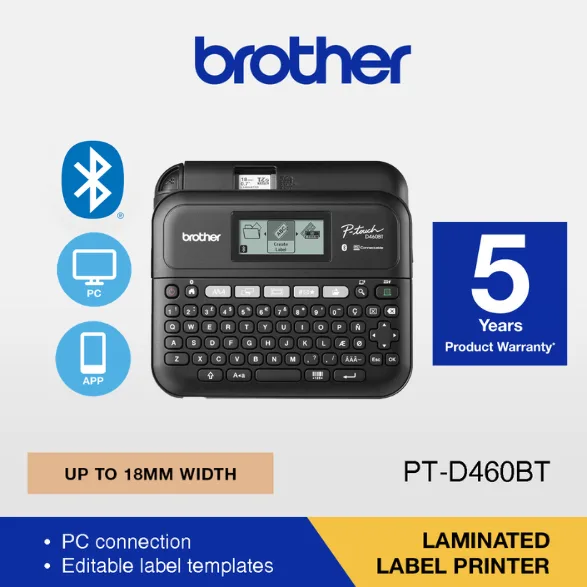
The PT-D460BT moves the decision from typing convenience to workflow. Its Malaysian manufacturer page confirms USB and Bluetooth label printing, tapes up to 18mm and speed up to 30mm per second. That makes it our first choice for a shared desk where label information may originate on a computer or phone rather than always being entered on the printer. The broader tape option offers more layout space for equipment names or storage identifiers, subject to the chosen template and margins.
Advantages
- USB and Bluetooth give a practical reason for the RM240 premium over the PT-D210.
- 18mm tape sits between compact identification and the wider layouts supported by the PT-D610BT.
- The stated maximum print speed matches the more expensive model.
Drawbacks and buyer fit
Buy it if connected printing and an 18mm ceiling genuinely match your work. Avoid paying the middle price just to print the same few 12mm names as the entry model. Conversely, do not buy it expecting a later software update to accept 24mm tape: the hardware width ceiling is part of the purchase. Confirm the current app and computer compatibility for the devices you actually use; Bluetooth branding alone does not establish every mobile feature or operating-system combination.
Brother PT-D610BT: pay for width and recall, not more speed
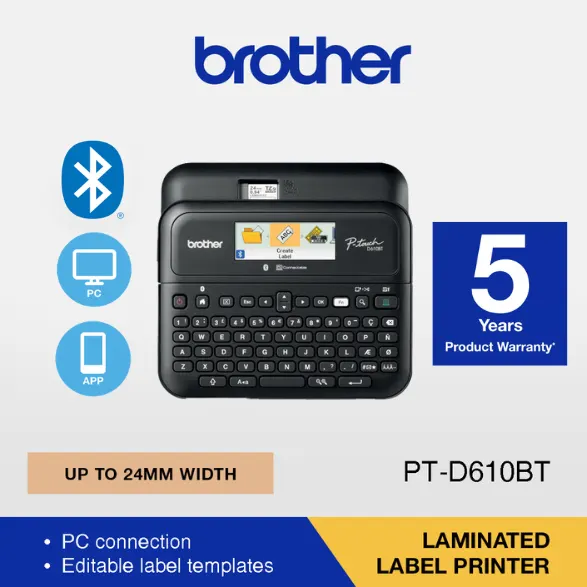
At RM629, the PT-D610BT is only RM130 above the PT-D460BT. Brother lists 24mm TZe tape support, a built-in QWERTY keyboard, graphical preview and 99 memory locations. Its USB and Bluetooth connections allow standalone use or printing from another device. The Malaysian manufacturer also describes iPrint&Label and P-touch Editor 6, including QR-code applications for retail and inventory. A wider layout can be valuable when the label must carry an identifier plus supporting text; check the actual code size and scan result before rolling out a whole stock system.
Pros
- Widest tape ceiling in this trio for information-heavy labels.
- Ninety-nine memory locations suit a larger catalogue of repeated formats.
- Standalone typing remains available alongside connected design work.
Cons and unnecessary upgrades
The quoted maximum speed remains 30mm per second, so the extra RM130 does not buy a higher stated speed than the PT-D460BT. Wider tape support also does not turn this into a large shipping-label printer. Choose it for a real 24mm layout or larger recall library; skip it if your output is a short cabinet name and you do not need the extra format space.
The Malaysian ownership checks that matter
Price the consumables as well as the printer. Confirm the supported TZe tape width, colour and adhesive type for the surface, and ask which starter cassette comes in the exact local bundle. We have not measured tape yield, battery endurance or cost per finished label. Do not assume every cassette length, accessory or promotional voucher is identical across sellers, and test adhesion on a discreet area before committing labels to delicate finishes.
The manufacturer’s catalogue tiles advertise a five-year product warranty with an asterisk. That is a conditional advertising statement, not proof of unconditional five-year coverage for every purchase. Ask Brother or the authorised Malaysian seller about registration, exclusions, service location and proof-of-purchase requirements. For Kuching buyers, confirm the service and return route rather than assuming an overseas set has the same local support.
The three official offers state free delivery above RM100 in Peninsular Malaysia and RM150 to East Malaysia. Each listed printer exceeds those thresholds, but the final postcode, checkout conditions, stock and dispatch time still need confirmation. The prices here are the checked official offers, not assumed voucher prices or a promise of future availability.
Final choice
Buy the PT-D460BT for connected everyday office labelling within 18mm. Keep RM240 by choosing the PT-D210 when short standalone labels and 12mm tape meet the whole brief, after adding any required power accessories. Spend the extra RM130 on the PT-D610BT only when 24mm labels or 99 stored formats solve a specific recurring job. Measure the label you need first; the product tier follows from that.
Sources checked: Brother Malaysia’s official model pages and e-store offers, 21 October 2026. Catalogue images are credited individually; this article does not claim manufacturer endorsement.
Manufacturer specification references: Brother PT-D210 · Brother PT-D460BT · Brother PT-D610BT
Pingback: 马来西亚标签机对比:Brother PT-D210、D460BT、D610BT怎么选 - Eazy Picks