
Twelve South HoverBar Duo 2nd Gen is worth considering when your phone or tablet needs to move between eye-level calls and an overhead working angle, rather than simply lean against a desk accessory. The Matte White model is RM479 at Malaysian retailer Storming Gravity on 18 October 2026. This review assesses the manufacturer’s design and current local offer; it is not a stability, load or long-term hinge test. The second-generation quick-switch attachment is its reason to exist, not a claim that every user needs an expensive stand.
Identity and fit: measure the device and the furniture
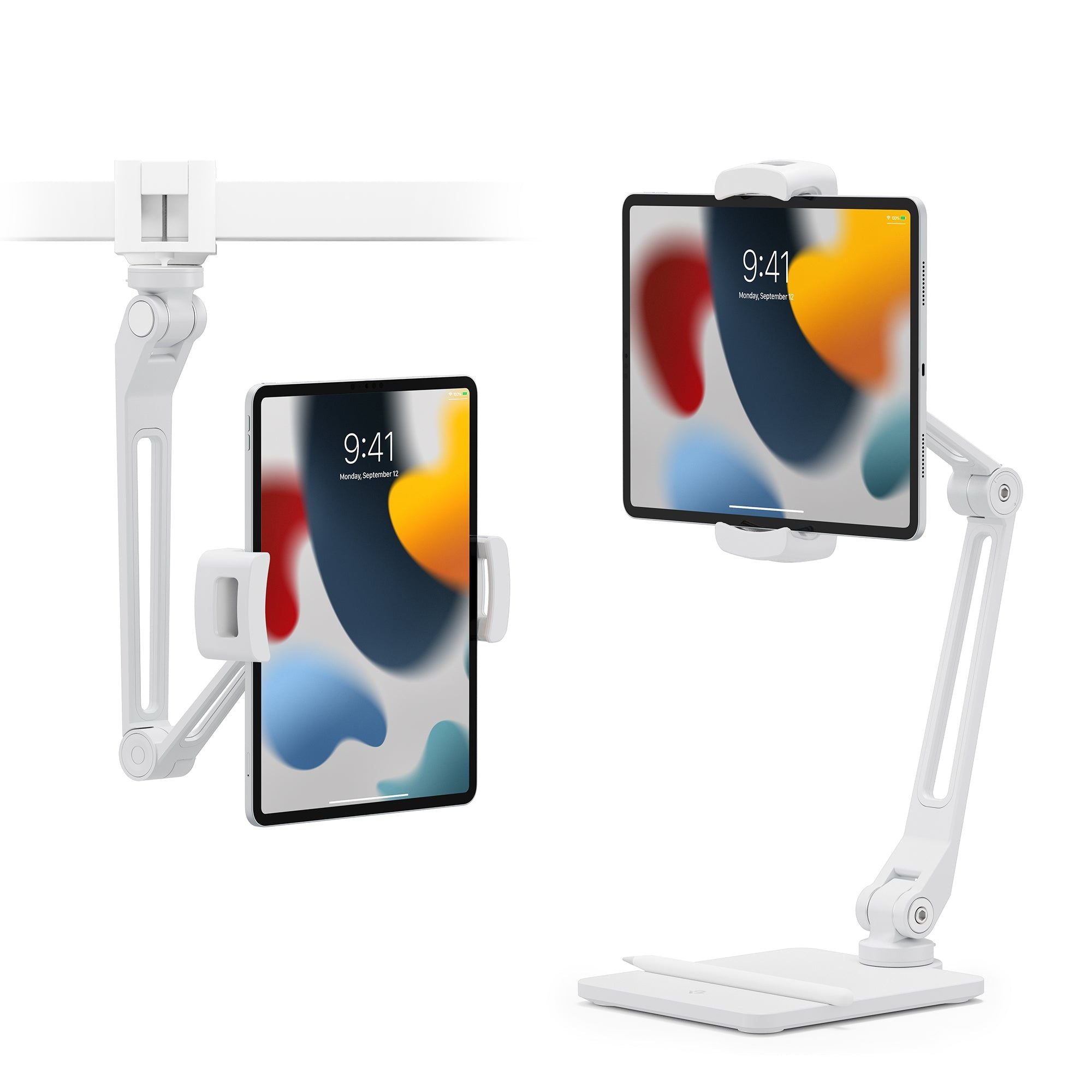
The copyable shopping name is Twelve South HoverBar Duo 2nd Gen Matte White. Manufacturer part 12-2144 corresponds to local SKU TS12-2144WH; the retailer’s White (Gen 2) variant is the offer checked here. A weighted desktop base and adjustable shelf clamp are included. The articulated arm extends to 15 inches, but that is arm length, not a promise of 15 inches of vertical clearance in every position. A multi-joint arm trades a simple footprint for more positioning choices.
Twelve South lists a 220mm maximum device-clip opening and a 127mm minimum fit dimension. Its case FAQ gives a combined device-and-case limit of 8.68 inches across and half an inch thick. Measure the actual clamped edges, including any case, instead of relying on screen diagonal. Smaller phones and iPad mini can be gripped top-to-bottom; a camera may require off-centre placement. The shelf clamp accepts an edge between 10mm and 34mm. A thick desk apron, bevel or inaccessible underside can defeat installation even when the desktop itself seems thin enough.
Advantages: two installations, not two separately bought stands
The Gen 2 QuickSwitch Tab lets the arm move between its desktop base and shelf clamp without rebuilding the attachment with the first generation’s hex-tool routine. This suits a home-office user who leaves the clamp at a recipe shelf and uses the base for calls. You still have to move the arm and device carefully; the quick-release feature is not a motorised lift or permission to carry the assembly by the tablet.
The rotating clip and adjustable joints permit portrait calls, landscape viewing and a downward camera angle for showing a drawing or repair. Raising the camera can improve framing compared with an iPad flat on a table. It does not make the webcam itself better or correct lighting and sound. The charging port remains accessible according to the maker, useful for a long session, but no charging electronics or power supply are included. Route the cable with slack so it cannot tug the stand.
Drawbacks: arm reach comes with setup constraints
This is a passive support, not a powered docking station. A keyboard, charger, device and any external camera remain separate. Touching a suspended screen creates a different lever from watching it hands-free; we have no measured wobble or maximum-load result. Buyers planning forceful sketching or repetitive screen tapping should test their real device at the intended reach rather than treat an attractive overhead photograph as proof of a rigid drawing surface.
The manufacturer’s compatibility list is broad, but a bulky protective shell and camera placement still need checking. A cabinet edge must offer a suitable clamping surface; avoid assuming a fragile shelf or glass edge is safe because its thickness falls inside the stated range. The desktop base occupies working space too. Measure where the base, elbow and charging lead will sit when the screen is both stored and in use.
When RM479 makes sense, and the cheaper decisions
The premium buys a dual-mount articulated workflow and Gen 2 switching. If you only watch videos at a single fixed angle, a simple low stand or a sound existing case support may solve the actual problem with less hardware. We did not verify a competing Malaysian price, so there is no invented saving figure. A wall arm may suit a permanent installation, but drilling, landlord permission and reach become different costs.
For overhead filming, compare the position of your phone’s rear lens with the clip and arm. The maker advises off-centre phone placement to expose the camera. That is useful guidance, not a guarantee of a shadow-free frame in your room. Buyers moving between two work zones gain more from the quick-switch tab than those who will install one mount once and never move it. Do not pay specifically for second-generation convenience if you will not use it.
Malaysia stock and warranty: White is not Black
The retailer’s current product record shows White (Gen 2), variant 40368474226758, available at RM479, with inventory policy deny and three units in its online stock field. The Black variant is unavailable at the same listed price. This is variant-specific online orderability, not a guarantee that every branch has stock. The page states shipping from Kuala Lumpur; confirm the final delivery quote and date for Kuching or your postcode rather than importing a pickup estimate into a courier promise.
Twelve South’s official page states a one-year manufacturer’s warranty against defects. That statement does not establish who handles a Malaysia claim, return freight, cosmetic wear or accidental device damage. Obtain the local seller’s written coverage and proof-of-purchase requirements before checkout. The official US return and free-shipping wording must not be presented as a Malaysian retailer entitlement.
Verdict: buy for repeated repositioning
Recommended for a creator or remote caller who has measured the phone/tablet plus case, has a compatible desk or shelf edge, and will regularly alternate between a weighted base and a clamp. Avoid it for a bare-minimum phone prop, an unsuitable furniture edge, an unverified heavy device, or a drawing setup that must remain completely rigid under pressure. At RM479 the strongest case is one arm serving two genuinely used locations. If all you need is one viewing angle, choose the simpler support instead.
Malaysia price and variant source
Pingback: Twelve South HoverBar Duo 2nd Gen 评测:RM479 值在反复换位吗? - Eazy Picks